
7 Tips for Choosing a QR Code Packaging Bag?

A Qr Code Packaging Bag is more than a pouch with a printed square. It must protect the product, scan reliably, and direct customers to useful information. Small details matter: a glossy finish can cause glare, while a seam or fold can distort the code. The right choice starts with the product, the filling process, and the conditions customers will face.

GS1’s Sunrise 2027 guidance identifies an important retail milestone: retailers are preparing to scan 2D barcodes at checkout by the end of 2027. This is an industry initiative, not a universal legal deadline. GS1 CEO Renaud de Barbuat has discussed the broader transition to 2D barcodes; however, a direct, verifiable quotation specific to QR-code packaging bags is not available here, so no quote is attributed to him. That distinction matters. Packaging decisions should rest on reliable evidence, not a polished but unsupported sound bite.

The seven tips ahead focus on practical checks: code size, print contrast, material compatibility, placement, testing, durability, and the information behind the scan. Test a filled bag, not just a flat sample. Scan it under ordinary shop lighting, from a phone held at a slight angle. Then test again after handling. A code that works only on a designer’s screen is not ready for customers. Some choices will still involve trade-offs, and a quick scan test cannot replace production trials.
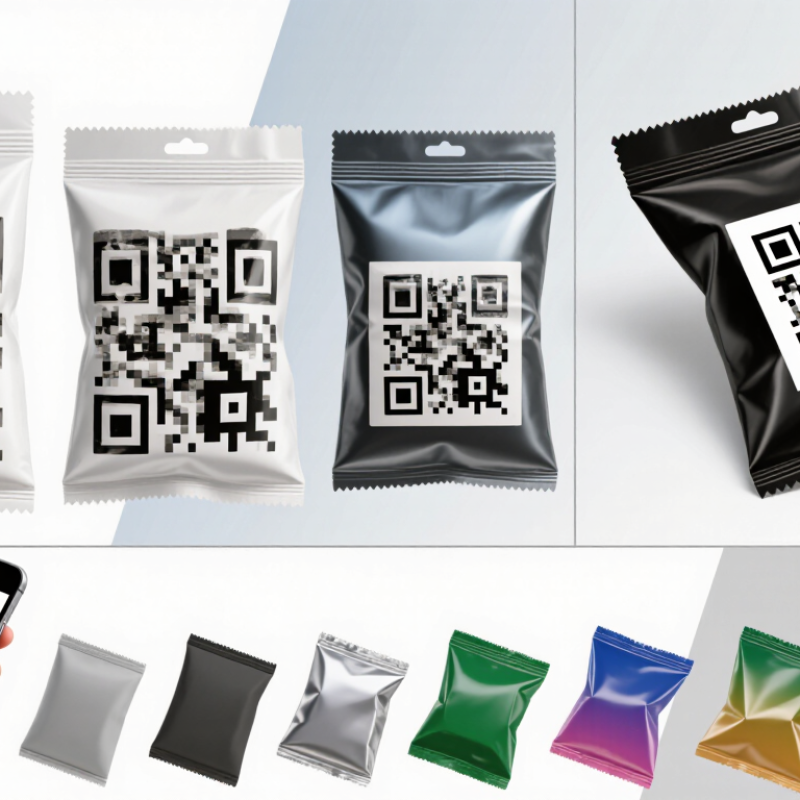
7 Tips for Choosing a QR Code Packaging Bag?

Define the QR Code’s Purpose and the Data the Packaging Bag Must Carry

7 Tips for Choosing a QR Code Packaging Bag?

Define the QR Code’s Purpose and the Data the Packaging Bag Must Carry

A QR code works best when shoppers know why they should scan it. Decide whether it will open product instructions, sourcing details, recycling guidance, or a batch-specific traceability page. Keep it useful. Put essential safety and use information directly on the bag; the code should add detail, not replace what customers need immediately. A tiny code beside a seam may look neat, but folds and glossy reflections can make it hard to scan.

Choose the destination before finalizing the artwork. A recycling page needs clear material guidance; a traceability page may need a lot number and current product records. Avoid sending every shopper to a crowded homepage. The GS1 system supports links between product identifiers and online information, which can help keep product details structured. Still, the destination must stay accurate after the packaging is printed.

PwC’s 2024 Voice of the Consumer Survey found that 46% of respondents said they were buying more sustainable products. That makes accessible sourcing and disposal details potentially valuable, but it does not mean every shopper will scan. Include only data you can verify and maintain, such as material composition or care instructions. A code can become an extra chore if the page loads slowly or asks for too much. Test it on a real filled bag, under ordinary store lighting, before approving the print.


Select Capacity: Version 40 Holds up to 7,089 Numeric Digits at Level L

A QR code can carry up to 7,089 numeric digits at Version 40 and error-correction Level L. That is the maximum, not a target for every package. A code holding a short product page link may scan more easily than one packed with long data. Keep the destination concise, and test the finished code rather than relying on a screen preview. Small details matter.

Version 40 uses a dense grid of 177 by 177 modules. On a flexible bag, folds, seams, glare, and ink spread can blur those tiny squares. Leave a clear margin around the code, print it on a flat area, and check contrast under ordinary store lighting. Level L provides the least error correction, so it may be a poor choice where scuffs or handling are likely. More error correction reduces available data capacity. Trade-offs are real.

Choose the smallest version that comfortably stores the content, then print a sample on the actual bag material. Scan it with several common phones, from different angles and distances. I would not assume a larger code is always better; placement and print quality can matter more. A quick test may still miss a future production issue, so inspect samples from the final print run.

Choose Bag Material, Surface Finish, and Contrast for Reliable Scanning

A QR code is only useful if customers can scan it quickly. Start by matching the bag material to how it will be handled. Paper and stiffer laminates usually keep a printed code flatter. Flexible film may crease when packed or squeezed, breaking up small squares. Test the code on a filled bag, not just a flat sample. That detail is easy to miss.

Surface finish matters. Glossy coatings can reflect overhead lights and make scanning unreliable, especially on curved or crinkled packaging. A matte area behind the code often reduces glare, but it may not suit every design or print process. There is no universally best finish. A clean prototype is not proof that every production bag will scan.

Contrast needs to be clear: dark code modules on a light, plain background are a dependable choice. Avoid placing the code over patterns, folds, seams, or transparent sections that reveal busy contents. Keep a clear margin around it, and make the code large enough for the expected scanning distance. Try several phones under store lighting. Then test bags from different parts of a production run; print variation can be subtle, yet still affect scanning.

QR Code Error Correction for Packaging Bags

Approximate codeword recovery capacity by QR Code error-correction level

Higher error correction can help a QR code remain readable when some data is obscured, but it does not guarantee successful scanning. For packaging bags, choose a surface that prints cleanly, avoid glare from glossy finishes, and maintain strong contrast between the code and its background. Values shown are approximate recovery capacities, not scan-success rates.

Set Artwork Rules: QR Codes Need a Four-Module Quiet Zone

On a flexible packaging bag, a QR code needs more than a sharp print. It also needs a clean border called a quiet zone. For standard QR codes, leave at least four modules of clear space on every side. A module is one small square in the code. If the smallest square prints at 0.5 millimeters, the border should be at least 2 millimeters wide. Keep this area free of text, patterns, seams, and decorative lines. Even a thin frame can crowd the code.

Tips: Set the quiet zone in the artwork file, not by eye. Use a plain background that contrasts clearly with the code. Keep the code away from pouch folds, cut edges, and seals, where film may wrinkle or artwork may shift. Avoid placing glossy details across the border. Small changes matter.

Check a printed sample, not just a screen preview. Scan it under ordinary indoor light, then try again with the bag slightly curved. If scanning feels slow, enlarge the code or widen its clear border before production. I have seen neat layouts lose reliability after a small design adjustment; it is easy to miss. Keep the final artwork file and a physical sample together for review.

Verify Print Quality Using ISO/IEC 15415 for 2D Symbols

A QR code can look sharp on screen and still fail on a flexible bag. ISO/IEC 15415:2011 measures printed 2D symbol quality on a 0.0–4.0 scale, examining factors such as contrast, modulation, and damage. Use a calibrated verifier, not a phone camera. Small details matter.

Test the code on the finished packaging, not only on a flat artwork proof. Glossy laminate can reflect light; creases can distort the quiet zone. Check samples from different print runs and record the lowest grade, not just the average. GS1 General Specifications set application-specific quality requirements, so agree on the minimum grade with your packaging and scanning teams before production. Not just appearance.

Keep a verifier report with the bag material, print settings, symbol size, and test conditions. This makes changes easier to trace when ink, film, or finishing shifts. A high grade on one sample is reassuring, but it does not prove every bag will scan. That part is easy to miss. Re-test after any material or process change, and include realistic wrinkles and handling in the assessment.

7 Tips for Choosing a QR Code Packaging Bag? - Verify Print Quality Using ISO/IEC 15415 for 2D Symbols

Tip What to Check Practical Verification Example Acceptance Target
1. Match the bag material to the product and environment Confirm that the film or paper structure suits the product’s moisture, oxygen, light, and handling requirements. Review the packaging specification and test printed samples after relevant filling, sealing, transport, or storage conditions. Choose a documented material structure that meets the product’s shelf-life and distribution requirements; there is no single material suitable for every product.
2. Choose a QR code size that scans reliably Check the printed symbol size, module clarity, and expected scanning distance. Test the actual printed bag with the intended phones or scanners, at typical viewing angles and distances, including after handling. Set a minimum symbol size based on the QR-code version, printer capability, and real scanning tests rather than relying on a universal size.
3. Preserve the quiet zone Keep the clear margin around the QR code free of text, graphics, folds, seals, and other marks. Inspect the final artwork and printed sample. QR Code specifications call for a quiet zone at least four modules wide on each side. Maintain at least four clear modules on every side, measured from the outer edge of the symbol.
4. Use strong contrast and avoid disruptive finishes Check contrast between the symbol and its background, as well as glare or distortion from coatings and reflective films. Assess the printed sample under normal lighting and scan it after any varnish, lamination, or other finishing process. Use a clearly distinguishable symbol/background combination and confirm that the finished surface does not prevent reliable decoding.
5. Verify print quality using ISO/IEC 15415 Measure the printed 2D symbol using a verifier configured for the applicable symbol and test conditions. Record the overall symbol quality grade and relevant parameter results from samples printed on production-equivalent material. For example, specify an overall grade of at least 2.5 (Grade B) as a project target; confirm that this threshold fits the applicable customer and application requirements.
6. Check variable data and code integrity Ensure that each QR code contains the correct destination or product information and remains unique where required. Decode samples from the start, middle, and end of a print run, then compare the decoded content with the approved data source. Require 100% content match for inspected samples and define a traceable process for checking variable-code data.
7. Validate the finished bag and production consistency Check whether folds, gussets, seams, wrinkles, or seal areas distort or cover the symbol. Inspect and scan filled, sealed bags from multiple points in the run; retain verifier results and corrective-action records. Place the code on a stable, accessible panel and set documented inspection frequency and acceptance limits for production.

Note: ISO/IEC 15415 provides a method for grading the print quality of 2D symbols. The example grade above is a suggested project target, not a universal requirement; agree on the acceptance criteria and verification conditions for the specific application.

Shopping cart